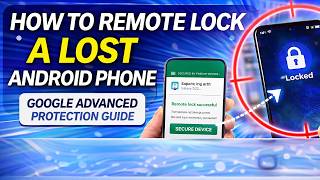
How to Remote Lock a Lost Android Phone Google Advanced Protection Guide
リアクション
2026年04月01日
How to Remote Lock a Lost Android Phone (2026 Guide)
To remote lock your lost Android phone using the latest 2026 method, go to on any browser. Enter your verified phone number associated with the device and complete the security challenge. Once confirmed, your phone will instantly lock, and you can display a custom message or phone number on the lock screen to help with its recovery.
If you are enrolled in the Google Advanced Protection Program, your device has an added layer of security. Even if a thief attempts a factory reset, the Activation Lock will prevent them from setting up the device without your Security Key or Passkey. For proactive protection, ensure Theft Detection Lock is enabled in Settings , Google ,Personal & device safety, which automatically locks the screen if the phone detects a "snatch-and-run" motion.
🛡️ Why Google Advanced Protection is a Game Changer
For high-risk users or anyone with sensitive data, the Advanced Protection Program provides Google's strongest account security:
Passkey Required: Hackers cannot sign in to your account remotely, even if they have your password, because it requires a physical security key or a verified biometric passkey on your trusted device.
Automatic Find Hub: Once you join the program, Find Hub (formerly Find My Device) is mandatory and always active, allowing for high-accuracy tracking even if the phone is offline.
Encrypted Remote Lock: The 2026 update ensures that a remote lock command is encrypted, meaning no one—not even a sophisticated hacker—can intercept the command to keep the device unlocked.
Malicious App Block: Advanced Protection automatically blocks all non-verified app installations, preventing "spyware" that could disable your tracking or security features.
🛠️ Proactive Security Checklist
Verify Your Number: Ensure your mobile number is verified at before you lose the device.
Enable Offline Find: Go to Settings , Google , Find Hub and turn on "Find your offline devices" to use the crowdsourced network.
Set a Security Question: In the Theft Protection menu, set a custom security question as a backup verification for remote locking.
🔗 Secure Your Digital Life with TechEasy
Don't wait until your phone is gone! Check out our deep dives into the latest Android security features. Visit: .
Watch These Related Videos Next:
🔐 How to Create Passkeys for Google Account (Step-by-Step): https://youtu.be/WstyQw3UJ9g
📱 Nothing Phone 4a - Essential Key & Hidden Security: https://youtu.be/FjI2Gqge_Ok
🛠️ How to Reset Google Settings on Android Safely: https://youtu.be/YUA2QhbprhQ
⚡ Phone Stolen? Lock it Permanently in 5 Seconds: https://youtu.be/cmUB20MuvlE
🛒 Recommended Anti-Theft Accessories
Stop the theft before it happens with these top-rated security accessories from Flipkart:
The HICOBER Anti-Theft Phone Wrist Strap is a durable jute and woven dori lanyard that attaches to any phone case. It provides a secure tether to your wrist, preventing "snatch-and-run" thefts in crowded areas.
---
🚀 **Connect with Me!** 🚀
🌐 **Website:https://techanswered.com/
📧 **Business Inquiries:[email protected]
📸 **Instagram:https://www.instagram.com/techeasy777/
🐦 **Twitter:https://x.com/123gadgetinfo
To remote lock your lost Android phone using the latest 2026 method, go to on any browser. Enter your verified phone number associated with the device and complete the security challenge. Once confirmed, your phone will instantly lock, and you can display a custom message or phone number on the lock screen to help with its recovery.
If you are enrolled in the Google Advanced Protection Program, your device has an added layer of security. Even if a thief attempts a factory reset, the Activation Lock will prevent them from setting up the device without your Security Key or Passkey. For proactive protection, ensure Theft Detection Lock is enabled in Settings , Google ,Personal & device safety, which automatically locks the screen if the phone detects a "snatch-and-run" motion.
🛡️ Why Google Advanced Protection is a Game Changer
For high-risk users or anyone with sensitive data, the Advanced Protection Program provides Google's strongest account security:
Passkey Required: Hackers cannot sign in to your account remotely, even if they have your password, because it requires a physical security key or a verified biometric passkey on your trusted device.
Automatic Find Hub: Once you join the program, Find Hub (formerly Find My Device) is mandatory and always active, allowing for high-accuracy tracking even if the phone is offline.
Encrypted Remote Lock: The 2026 update ensures that a remote lock command is encrypted, meaning no one—not even a sophisticated hacker—can intercept the command to keep the device unlocked.
Malicious App Block: Advanced Protection automatically blocks all non-verified app installations, preventing "spyware" that could disable your tracking or security features.
🛠️ Proactive Security Checklist
Verify Your Number: Ensure your mobile number is verified at before you lose the device.
Enable Offline Find: Go to Settings , Google , Find Hub and turn on "Find your offline devices" to use the crowdsourced network.
Set a Security Question: In the Theft Protection menu, set a custom security question as a backup verification for remote locking.
🔗 Secure Your Digital Life with TechEasy
Don't wait until your phone is gone! Check out our deep dives into the latest Android security features. Visit: .
Watch These Related Videos Next:
🔐 How to Create Passkeys for Google Account (Step-by-Step): https://youtu.be/WstyQw3UJ9g
📱 Nothing Phone 4a - Essential Key & Hidden Security: https://youtu.be/FjI2Gqge_Ok
🛠️ How to Reset Google Settings on Android Safely: https://youtu.be/YUA2QhbprhQ
⚡ Phone Stolen? Lock it Permanently in 5 Seconds: https://youtu.be/cmUB20MuvlE
🛒 Recommended Anti-Theft Accessories
Stop the theft before it happens with these top-rated security accessories from Flipkart:
The HICOBER Anti-Theft Phone Wrist Strap is a durable jute and woven dori lanyard that attaches to any phone case. It provides a secure tether to your wrist, preventing "snatch-and-run" thefts in crowded areas.
---
🚀 **Connect with Me!** 🚀
🌐 **Website:https://techanswered.com/
📧 **Business Inquiries:[email protected]
📸 **Instagram:https://www.instagram.com/techeasy777/
🐦 **Twitter:https://x.com/123gadgetinfo